SenseExplorers

No account needed · the whole menu

What's on the menu

Everything inside SenseExplorers, laid out before you sign up: the exploring tools, the five-step session, what parents get, and how sound and privacy are handled.

The exploring tools

Eight ways in. Each one starts with what a child can already manage, and stops whenever they want it to.

LookPhoto ExplorerA blurred picture first, then clear, then a zoomable close-up, then the real thing nearby.
ListenSound ExplorerGentle, everyday and loud sounds. Nothing plays until a child taps play, and volume is capped.
TouchTextures and fidgetsDry, soft, rough, cool, sticky. Children meet a texture in a photo before trying it on their hands.
SniffSmell detectiveEvery smell step is vetted for safety, and grown-ups are asked to stay nearby throughout.
TasteTaste wordsNo pressure to eat. Children find words for taste and texture, and choose whether to try.
MoveMovement gamesSlow, heavy and quick movement, one choice at a time, with a stop button always on screen.
Push and PullHeavy workPushing, pulling and carrying to settle a body that needs deep pressure before or after a busy day.
Body SignalsWhat the body is sayingNoticing a signal first, then where it sits in the body, then what helps, then real life.

Every session, the same five steps

Predictable order is calming. Each step ends with a face or colour rating, so exploring builds a picture over weeks rather than one big day.

  1. Step 1

    Far away

    A soft, blurred or partial picture, so nothing arrives all at once.

  2. Step 2

    Clear

    The same thing, in focus, with a short line of text and read-aloud.

  3. Step 3

    Close up

    A zoomable detail, so children can look as closely as they choose.

  4. Step 4

    In real life

    A photo of the thing in the place they will actually meet it.

  5. Step 5

    Your turn

    An invitation to find it nearby with a grown-up. Always optional.

A stop button stays on screen for the whole session.

Junior mode is picture-based. Teen mode is more grown-up and text-led.

Grown-up settings sit behind a simple question children cannot guess.

What parents and carers get

The child's pages are theirs. The parent dashboard is where you see what is building up and keep it somewhere safe.

Feelings check

A quick check on how today feels, with a mood scale for teenagers and faces for younger children.

Weekly patterns

The last seven days of check-ins and feelings side by side, so patterns show up without anyone keeping a diary.

My Calm Kit

The sounds, photos, activities and words that help, saved while things are calm and ready for a hard day.

Sensory Passport

What is easier, what is harder and what helps, written from real exploring and ready to hand to school or clinic.

Rewards and progress

Brave badges and a progress view for younger children, and a private record of what they have explored for teens.

Tips for each sense

Noise, clothes, smells, busy places, school and body signals: what to try, and when, in plain words.

Dr Susan Ozer's books

Books and free leaflets for parents, schools and clinicians, linked from inside the app.

Optional expert advice

A written question or a short telephone call with Dr Susan Ozer. Optional, paid, and never needed to use the app.

Teenagers choose what is shared with a parent: their private mood notes stay private unless they decide otherwise.

Free printable packs

Printable versions of the tools, for the table, the car or the classroom. Download them free with your account.

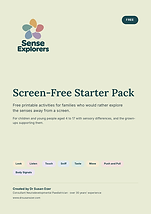
Cover of the Screen-Free Starter Pack
Free

Screen-Free Starter Pack

Feelings faces, Body Detective, Look and Listen ladders, Calm Kit, Sensory Passport and a brave steps chart.

11 pages · PDF · A4

Create a free account to download this pack. It takes a moment and keeps your child's details private.

Create free accountLog in
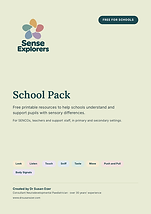
Cover of the School Pack
Free

School Pack

Staff guide, classroom poster, sensory-friendly checklist, pupil Sensory Passport, signal cards and wall art.

Free to print and copy for use within your own school or setting.

8 pages · PDF · A4

Create a free account to download this pack. It takes a moment and keeps your child's details private.

Create free accountLog in
More about the screen-free packs

Safety, sound and privacy

Nothing plays on its own

No autoplay, no surprise sounds, no background music. Every sound starts with a tap.

Volume is capped

Sound starts quietly and is capped at 60%. Loud or sudden sounds stay locked until a grown-up unlocks them for that child.

Private by default

Photos and sounds a family uploads are stored privately, never analysed for advertising, and never shared outside the account.

Not difficult. Overwhelmed.

The whole app is free. Create an account, add a nickname and an age band, and start with one small sense.

SenseExplorers is not a medical device and does not diagnose, treat, cure or prevent any medical condition. Always check with your child's doctor before making decisions about their health. Read the privacy and safeguarding page and the terms and conditions.